*better: More thorough, more relevant, more effective.
...more Alerts, more All Clears, more details, more control in your hands.
|
|
Foxhound is the better* Database Monitor for SQL Anywhere.
*better: More thorough, more relevant, more effective.
...more Alerts, more All Clears, more details, more control in your hands.
|
Breck Carter
Last modified: August 14, 1996
mail to: bcarter@bcarter.com
How do I prompt the user for copies, page range to print and other parameters just like the facility provided by DataWindow - Print?
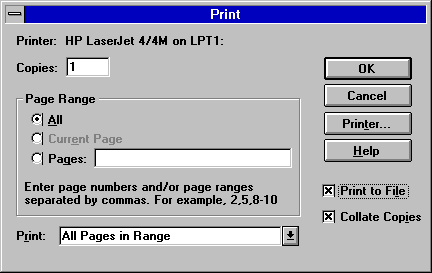
You can try checking "Prompt before printing" in the DataWindow painter
- Edit - Properties - Print Specifications. If you're lucky it will
display this window:
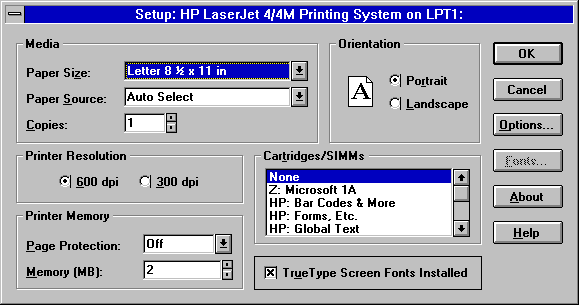
If not, then you're probably using an HP Laserjet printer and you get
this window instead:
Be sure to test your program after creating an executable. With
PowerBuilder 4 it would work OK in the development environment but
produce the wrong window when you run the EXE. With PowerBuilder 5 it
doesn't work properly in either environment: You get the HP Setup window
no matter what you do.
What you can do is create your own window and use it to issue the
DataWindow Print() call. Here's an example of a grow-your-own prompt
window:
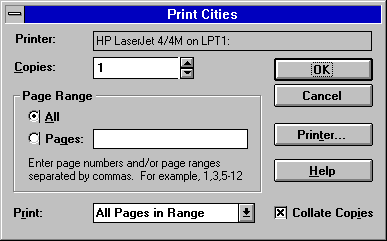
Here is the code for that window: Listing 1 shows how the function in
Listing 2 is called. Listing 3 shows the structure that is passed to
the window open script shown in Listing 4, and Listing 5 shows what
happens when the user fills in the parameters and clicks OK.
Listing 1: Calling The Prompt Function
f_prompt_before_printing ( "Print Cities", dw_city )Listing 2: The Prompt Function
/*
Description:
   Prompt for printer, copies, range, include and collate, then print
   a DataWindow. This is a replacement for DataWindow painter - Design -
   Print Specifications - Prompt before printing, which doesn't work   with
   some printer drivers (e.g., HP Laserjet) when an application .EXE is run.

Parameters:
   as_title   Response window title
   adw_to_print The DataWindow control to be printed

Return Value:
    1 Print worked OK: DataWindow print() function returned 1
    0    Print was probably cancelled by the user
   -1 Print failed: DataWindow print() function returned -1

Example:
   li_RC = f_prompt_before_printing ( "Print Employee", dw_employee )
   if li_RC = -1 then
      MessageBox ( "Print", "DataWindow print failed." )
   end if

Note:
   Weird mouse pointer behaviour has been experienced when Printer... is pressed,
   then Cancel. This may be caused by an interaction between the print setup
   dialog box, the MS Mouse 2 driver (version 9.x), and the "Snap To" mouse
   pointer option. It's not catastrophic, just strange.

Note:
   Sle_printer has tab order > 0 so that very long network printer specifications
   can be viewed by scrolling to the right. However, it is marked "display only".

Note:
   Accelerator keys have been chosen to agree with MS Word 6; e.g., &P has been
   reserved for "Print What".

Possible MS Word 6 - style future enhancements:
   &Print What                (DropDownListBox above Copies - application dependent)
   Page Range - Curr&ent Page (RadioButton between All and Pages)
   Page Range - Selectio&n    (RadioButton to right of Current Pages)
   Print to Fi&le             (CheckBox above Collate Copies)
   &Options...                (CommandButton above Printer...)

Alternative enhancements:
   MS Excel 5 differs in both details and basic design...
   ...or look at the stuff in Microsoft Office 95...
   ...and/or wait for PB5.

Weird alternative:
   Call PrintDlg() in commdlg.dll... LOTS of work in Windows 3.x, and
   who knows what Win95 has :)

*/

integer                  li_RC
s_prompt_before_printing lstr_prompt_before_printing

li_RC = 0  // until proven otherwise

lstr_prompt_before_printing.s_title     = as_title
lstr_prompt_before_printing.dw_to_print = adw_to_print

OpenWithParm ( w_prompt_before_printing, lstr_prompt_before_printing )

li_RC = message.DoubleParm

if IsNull ( li_RC ) then
   li_RC = 0 // assume print was cancelled
end if

return li_RC
Listing 3: The OpenWithParm Structure
$PBExportHeader$s_prompt_before_printing.srs
$PBExportComments$See f_prompt_before_printing()
global type s_prompt_before_printing from structure
    string s_title
    datawindow dw_to_print
end type
Listing 4: Window Open Script
s_prompt_before_printing lstr_prompt_before_printing
integer                  li_copies
string                   ls_page_range
integer                  li_range_include

lstr_prompt_before_printing = message.PowerObjectParm

SetPointer ( HourGlass! )

this.title     = lstr_prompt_before_printing.s_title
this.idw_print = lstr_prompt_before_printing.dw_to_print

this.sle_printer.text = this.idw_print.describe ( "DataWindow.Printer" )

li_copies = integer ( this.idw_print.describe ( "DataWindow.Print.Copies" ) )

if li_copies < 1 then
   this.em_copies.text = "1"
else
   this.em_copies.text = string ( li_copies )
end if

ls_page_range = this.idw_print.describe ( "DataWindow.Print.Page.Range" )

if ls_page_range = "" then
   this.rb_all.checked   = true
   this.rb_pages.checked = false
   this.sle_pages.text   = ""
else
   this.rb_all.checked   = false
   this.rb_pages.checked = true
   this.sle_pages.text   = ls_page_range
end if

li_range_include = integer ( this.idw_print.describe &
   ( "DataWindow.Print.Page.RangeInclude" ) )

if li_range_include = 2 then
   this.ddlb_print.text = "Odd Pages"
elseif li_range_include = 1 then
   this.ddlb_print.text = "Even Pages"
else
   this.ddlb_print.text = "All Pages in Range"
end if

if this.idw_print.describe ( "DataWindow.Print.Collate" ) = "yes" then
   this.cbx_collate.checked = true
else
   this.cbx_collate.checked = false
end if
Listing 5: CB_OK.Clicked Script
integer li_RC
string  ls_modify_argument
string  ls_modify_error

SetPointer ( HourGlass! )

ls_modify_argument = "DataWindow.Print.Copies = " &
   + string ( parent.em_copies.text ) + " "

if parent.rb_all.checked then
   ls_modify_argument = ls_modify_argument + "DataWindow.Print.Page.Range = '' "
else
   ls_modify_argument = ls_modify_argument + "DataWindow.Print.Page.Range = '" &
      + sle_pages.text + "' "
end if

if parent.ddlb_print.text = "Odd Pages" then
   ls_modify_argument = ls_modify_argument + "DataWindow.Print.Page.RangeInclude = 2 "
elseif parent.ddlb_print.text = "Even Pages" then
   ls_modify_argument = ls_modify_argument + "DataWindow.Print.Page.RangeInclude = 1 "
else
   ls_modify_argument = ls_modify_argument + "DataWindow.Print.Page.RangeInclude = 0 "
end if

if parent.cbx_collate.checked then
   ls_modify_argument = ls_modify_argument + "DataWindow.Print.Collate=yes "
else
   ls_modify_argument = ls_modify_argument + "DataWindow.Print.Collate=no "
end if

ls_modify_error = parent.idw_print.modify ( ls_modify_argument )
if ls_modify_error <> "" then
   MessageBox ( "Print Modify Error", ls_modify_error )
   CloseWithReturn ( parent, -1 )
end if

li_RC = parent.idw_print.print ( true )

CloseWithReturn ( parent, li_RC )
Breck Carter can be reached by phone at (416) 763-5200 or via email at bcarter@bcarter.com.