*better: More thorough, more relevant, more effective.
...more Alerts, more All Clears, more details, more control in your hands.
|
|
Foxhound is the better* Database Monitor for SQL Anywhere.
*better: More thorough, more relevant, more effective.
...more Alerts, more All Clears, more details, more control in your hands.
|
Breck Carter
Last modified: July 26, 1996
mail to: bcarter@bcarter.com
How can I determine when a tabular DataWindow in an MDI sheet needs to be refreshed? Other sheets, and even other users may have added, changed or deleted rows that are listed in the tabular DataWindow.
With all due respect to IBM, Oracle and even Powersoft and Sybase, Watcom does things the way they should be done.
The implementation of Default Timestamp in SQL Anywhere 5 is a case in point: "Not only can the new timestamp default be used to increase the level of consistency checking, it can also be used for application purposes. That's because the column contains real date and time values instead of the strange counter that SQL Server calls 'timestamp'."
The activate event is a good place to check to see if a DataWindow needs refreshing since that event is fired when the user switches back to that window after doing other work. The question is "How?" and that's where database columns defined with default timestamp come in to play.
Default timestamp columns are automatically updated whenever a row is inserted or updated, as opposed to default current timestamp which is set only on insert. By selecting max ( default_timestamp_column ) you can determine if the value has changed since the previous DataWindow retrieve. Selecting count(*) will tell you if any rows have been deleted.
Of course, count(*) won't change if one row was deleted and another one was inserted, but in that case max ( default_timestamp_column ) will be different.
The code in Listings 1, 2, 3 and 4 show the code to do the checking. The critical logic isn't placed in the activate event because that's too dangerous. It is placed in a "ue_post_activate" user defined event that is fired from the activate script via PostEvent(). Code is also included to prevent endless loops caused by activate firing again when the user clicks Yes or No to close the message box.
Listing 1: Window Instance Variables
   public:
   long il_row_count = -1 // "uninitialized" value
   datetime idt_last_change = DateTime ( today(), now() )
   boolean ib_activate_running = false
   boolean ib_skipping_refresh = false
Listing 2: Activate Event
   this.ib_activate_running = true
   this.PostEvent ( "ue_post_activate" )
Listing 3: UE_Post_Activate Event
   long ll_row_count

   // User has already been asked.

   if this.ib_skipping_refresh then
      this.ib_skipping_refresh = false
      return
   end if

   // This is a fresh activate.

   ll_row_count = this.of_refresh_if_necessary()
   if ll_row_count < 0 then
      return
   end if
Listing 4: OF_Refresh_If_Necessary() Function
   integer  li_RC
   DateTime ldt_last_change
   long     ll_row_count

   // Check for adds, changes, deletes.

   select max ( last_change ),
          count (*)
     into :ldt_last_change,
          :ll_row_count
     from province
    using SQLCA;

   if SQLCA.SQLCode <> 0 then
      MessageBox ( "Error", "Select" )
      this.ib_activate_running = false
      return -1
   end if

   // Is it the first call, or has anything changed?

   if ( ldt_last_change <> this.idt_last_change ) &
   or ( ll_row_count <> this.il_row_count ) then

      if this.il_row_count = -1 then

         // The first call requires unconditional retrieval.

         li_RC = 1

      else

         // Suppress activate after MessageBox closes.

         this.ib_skipping_refresh = true

         // Ask the user, which will cause a 2nd activate
         // after the MessageBox closes.

         li_RC = MessageBox ( "Confirm", &
            "The database has changed since the list of~r~n" &
               + "provinces was last displayed.~r~n~r~n" &
               + "Do you want to refresh the list of provinces?", &
            question!, &
            YesNo!, &
            1 )

      end if

      if li_RC = 1 then
         this.idt_last_change = ldt_last_change
         this.il_row_count = this.of_retrieve()
      end if

   end if

   this.ib_activate_running = false
   return this.il_row_count
Listings 5 shows the supporting code that does the actual retrieval. It is not necessary to put anything in the window open event because the activate script will take care of filling the DataWindow when the window first opens.
Listing 5: OF_Retrieve() Window Function
   integer li_RC
   long    ll_row_count

   li_RC = this.dw_province.SetTransObject ( SQLCA )
   if li_RC <> 1 then
      MessageBox ( "Error", "SetTransObject" )
      return -1
   end if

   ll_row_count = this.dw_province.retrieve()
   if ll_row_count < 0 then
      MessageBox ( "Error", "Retrieve" )
      return -1
   end if

   return ll_row_count
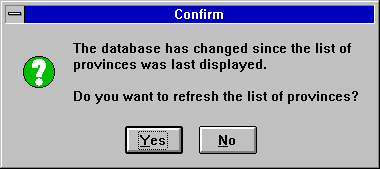
Here's what you see when the table has changed and the you switch to the
window containing the DataWindow that is now out of date:
Breck Carter can be reached by phone at (416) 763-5200 or via email at bcarter@bcarter.com.